How does Whatnot seller support work now?
Under Seller Provided Support, the standard for all US sellers since September 1, 2026, a buyer’s request lands in your Whatnot inbox before anyone else sees it. For Whatnot seller support requests, you have two business days to reply. Sellers with Premier Shop status answer at least 95% of requests in that window, so a fast reply also helps your standing.
- The buyer asks Whatnot Support for a second review of your reply
- The order is a break or Surprise Set, and the buyer asks about an item from the package
What can a seller do when a request comes in?
Whatnot seller support gives you four ways to respond, and you can pick whichever fits the order best. The right choice usually depends on what your packing video shows, so it’s worth opening the video on the vAudit ecommerce packing video evidence system before you decide.
- A full refund, with or without asking for the item back.
- A partial refund, so the buyer keeps the item at a fair adjusted price. If they’d rather not, they can still get a full refund by sending the item back.
- A replacement, shipped within 48 hours to keep this option open.
- A message to the buyer to ask for details or explain how Buyer Protection applies to the order.
How should I handle a missing-item request?
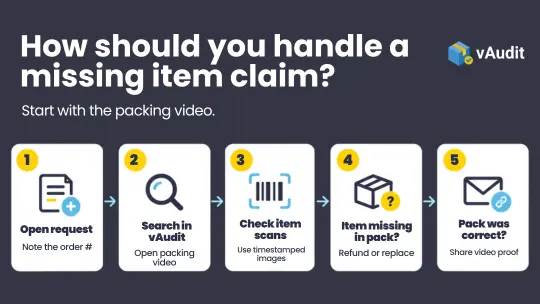
- Open the request in your Whatnot inbox and note the order number.
- Search that order number in vAudit and open the packing video.
- Skip to the moment each item goes into the box. vAudit saves a timestamped image every time you scan an item, so this takes seconds.
- If the video shows the item not going into the box, offer a refund or replacement.
- If the pack was done correctly, reply with a short note and the video link in the support chat or email.
What’s the best way to check a wrong-item request?
- Ask the buyer for a photo of what arrived, including any card number, size tag or serial.
- Open the show’s video receipt to confirm what they won.
- Open the vAudit video for the order to see what you packed.
What evidence makes Whatnot seller support replies easier?
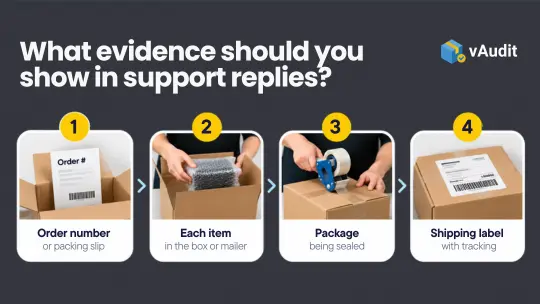
- One continuous packing video, showing the first item going in to the box sealing
- The order number or packing slip visible in the shot
- The shipping label and tracking number readable on camera
- A close view of fine details, like a card’s number or a sneaker’s size label
What happens if the buyer asks Whatnot for a second review?
How does vAudit support Whatnot sellers day to day?
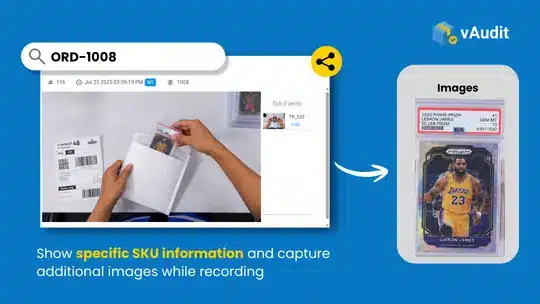
- Every order has its own video, found in seconds by order number.
- A timestamped image is saved each time you scan an item, which is ideal for Whatnot cards and other small, serialized items.
- Videos are available for the retention period you choose.
- Each video can be shared as a link easily in your customer support chat or email.
vAudit gives you the packing video proof for refunds on every channel you sell through. Larger operations can use the vAudit Video Logger with an overhead camera to record packing videos at a higher volume.
Frequently asked questions on Whatnot Seller Support
1. How much does it cost a seller to resolve a missing-item or wrong-item request?
- A partial refund costs only the amount the buyer accepts.
- A full refund costs the order amount, with the item coming back to you if you asked for a return.
- A replacement costs you the replacement item, and the original sale stays in place.
- A message with your vAudit packing video costs nothing when the video shows the order was packed as sold.
When a buyer takes the request to Whatnot Support and Whatnot approves a refund, the seller may be charged the refund costs and the commission on that order.
Resolving the request directly keeps the decision, and the amount, in your hands.
2. What should I check when a returned item arrives?
You have 48 business hours after a return is delivered to confirm it or ask Whatnot to review it, so it pays to check returns the day they come. Whatnot’s Buyer Protection is clear that a refund isn’t completed if a different item comes back, or if the item has been used or altered. Your original packing video is the reference point for that check.
- Open the packing video on vAudit for the original order and note the item’s condition, card number, size tag or serial.
- Unpack the return and compare it with what the video shows.
- If everything matches, confirm the return and the buyer’s refund goes through.
- If something looks different, flag it for Whatnot’s review inside the 48-hour window and attach your video and photos of the returned item.
Accepting a return is usually the smoother path on a fair wrong-item request. Whatnot notes that a billback can still apply whether or not a return is accepted, so confirming the return and checking it carefully is the best way to protect your earnings.
3. What packaging does Whatnot expect from sellers?
Whatnot holds sellers responsible for proper packaging, and good packaging keeps your fees and selling privileges in good standing. It also gives every item, from a single card to a stack of graded slabs, the best chance of arriving exactly as it left your table. The main points to follow are:
- Wrap items before boxing them, with about 2 inches of padding on each side
- Use a box or padded mailer that suits the item, so nothing moves in transit
- Ship items over $20 in a padded mailer or box, as Whatnot requires for these orders
- Protect Whatnot cards in sleeves and top loaders before they go into the mailer
A vAudit packing video shows all of this on camera. If a buyer asks about the condition of their order, the video shows the item, the padding and the sealed box in one clip.
4. How can sellers prevent missing-item and wrong-item requests at the pack station?
Packing slips often happen when several orders sit on the bench at once, or when two similar items share a shelf. A few habits at the pack station keep each order accurate before it ships:
- Pack one order at a time and clear the bench before starting the next.
- Scan or check each item against the packing slip as it goes into the box.
- Show card numbers, sizes and variants on camera for Whatnot cards and other high value item packing.
- Seal the box and apply the label on camera, so the label is readable in the video.
- Record the whole packing in one continuous take.
vAudit Desk makes steps 2 to 5 part of the normal routine. Recording starts when you scan the order ID, a timestamped image is saved for every item you scan, and the finished video is saved under the order number.

Superstore

Aura Gold

IQ Pack