This blog is written for Whatnot sellers who run a Whatnot live auction or regular listings, and it shows how vAudit’s packing video proof supports your billback appeals.
What does Whatnot seller help say about billback appeals?
Since September 1, 2026, Seller Provided Support has been the standard support model for all US sellers. Buyers now contact the seller first, and Whatnot steps in only when a request is escalated. That makes it the starting point for any Whatnot seller to question refunds, billbacks and appeals.
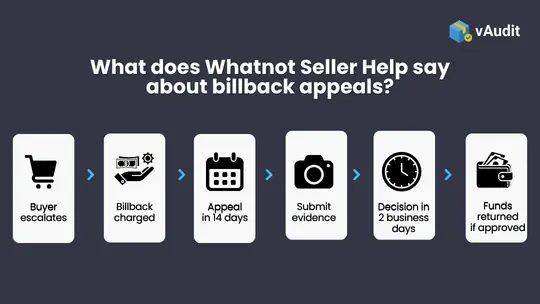
- A billback is a deduction from your Whatnot account balance to cover a buyer refund.
- A billback follows a buyer request that was escalated to Whatnot Support.
- You can appeal a billback within 14 calendar days of the charge.
- Whatnot accepts photos, fulfillment footage and tracking as evidence.
- Whatnot shares the appeal result within two business days.
- If the appeal is approved, Whatnot returns the refunded amount, including eligible return shipping, to your seller ledger.
What is a billback on Whatnot?
- The buyer’s request was not answered within two business days.
- The buyer escalated the request to Whatnot Support.
- Whatnot reviewed the order and approved a refund under its Buyer Protection.
How do I appeal a Whatnot billback?
- Open the Whatnot app and go to your orders.
- Tap the order that was billed back.
- Select Appeal this decision.
- Write an explanation of why the billback should be reversed.
- Attach your evidence, such as fulfillment footage, photos and tracking.
- Submit the appeal within 14 calendar days of the billback charge.
What evidence should I attach to a Whatnot billback appeal?
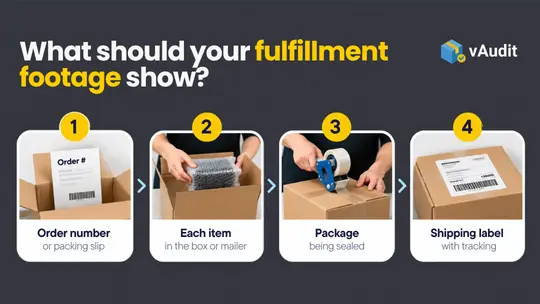
What should fulfillment footage show?
- the order number or packing slip
- each item placed in the box or mailer
- the package being sealed
- the shipping label with tracking, readable on camera
How do photos and tracking help?
What does the High Value Loss Reimbursement Policy mean for card sellers?
- one continuous video showing the cards packed, the package sealed and the label with tracking applied
- footage kept for at least 75 days
- a reply to Trust & Safety within two calendar days when they contact you
How can Whatnot sellers reduce billbacks?
- issue a full or partial refund, with or without a return
- send a replacement
- message the buyer to ask for details or explain why the order is not covered
How does vAudit record packing videos for Whatnot orders?
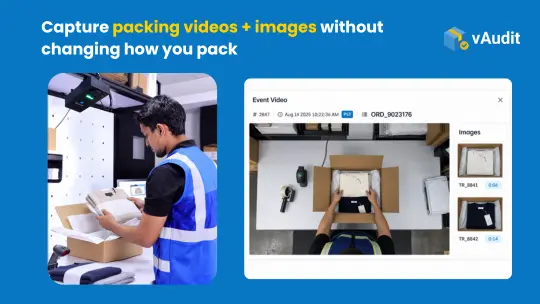
vAudit is packing video software for Whatnot orders. It suits sellers who ship from a home desk or small studio. vAudit Desk is an application that records packing videos using a USB webcam on your laptop.
- Recording starts when you scan the order ID, so each video is saved under its Whatnot order number.
- A timestamped image is saved each time you scan an item.
- Videos are kept for the retention period you set, such as 75 days or longer.
- Videos can be easily retrieve in seconds by searching for the respective order ID and shared as a link in email or support chat.
For larger shipping operations, the vAudit packing video recording system records packing videos with an overhead camera. When a billback appears, you search the order number in vAudit, open the video and add it to your appeal.
Frequently Asked Questions About Whatnot Seller Help
1. Does a Whatnot billback include commission as well as the refund?
2. How long should Whatnot sellers keep packing videos?
3. What should card breakers do when a high-value card from a Whatnot live auction is reported as not received?
Card breakers should reply to Whatnot Trust & Safety within two calendar days with continuous fulfillment footage of the order. This matters for anyone selling cards on Whatnot. Under the Whatnot High Value Loss Reimbursement Policy, a seller without valid fulfillment proof may be billed back the card’s full market value, and Whatnot does not accept photos alone for these orders. A clear response follows four steps:
- Find the packing video for that order.
- Check that it shows the cards packed, the package sealed and the label with tracking applied, in one continuous shot.
- Reply to Trust & Safety within two calendar days with the video and tracking number.
- Keep the footage for at least 75 days.
The same policy sets rules that keep high-value orders fully covered from the start:
- Complete every order in which a buyer has secured a high-value item, because Whatnot does not allow sellers to cancel these orders.
- Ship high-value items only to the buyer listed in your Seller Hub.
- Use a sturdy package rather than a plain white envelope for items over $20.
vAudit Desk records the continuous video Whatnot asks for on every break order and saves it under the order number, ready for Trust & Safety.
4. Who handles chargebacks on Whatnot, the seller or Whatnot?
Whatnot handles chargebacks and payment disputes itself, so sellers do not have to deal with the buyer’s bank. A chargeback starts when a buyer disputes the charge with their bank. A billback is different: it follows a buyer request that Whatnot Support reviews and refunds under Buyer Protection. For Whatnot selling, the work is split clearly between Whatnot and the seller. Whatnot takes care of:
- Chargebacks and payment disputes
- Cases its systems flag for unusual refund behavior or suspected fraud
- Refunds where the evidence is inconclusive and does not point to seller action, up to a reasonable limit
Sellers take care of:
- Buyer requests in the Seller Provided Support inbox, within two business days
- Billback appeals, within 14 calendar days
- Fulfillment evidence such as packing footage, photos and tracking
This split means your evidence matters most in buyer requests and billback appeals. vAudit keeps that evidence organized by order number, so it is ready for both.
5. Can a packing video settle a buyer request before it becomes a billback?
Yes, a packing video can settle many buyer requests before Whatnot Support gets involved. Whatnot seller help guide says that sellers with photo or video evidence from their packing station can share it with the buyer and explain why a refund is not due. You have two business days to reply under Seller Provided Support, so speed matters as much as the video itself. A good reply follows the same order each time:
- Open the request in your Seller Provided Support inbox.
- Find the packing video for that order.
- Send the buyer a link to the video and describe what it shows: the item packed, the package sealed and the label applied.
- If it applies, explain why the order is not covered under Buyer Protection.
- Send your reply within two business days.
When the video shows the buyer has a fair point, Whatnot gives you other ways to resolve the request:
- A full or partial refund, with or without a return
- A replacement item
vAudit saves each video under its Whatnot order number and creates a secure link for easy shareability. You can send proof to a buyer within minutes, even on a busy Whatnot live show night.

Superstore

Aura Gold

IQ Pack