
How does packing process video capture work?
A packing video system records what happens at the pack station. The camera, positioned over the bench, captures which products go in, in what quantity, and in what sequence.
The system does not record continuously across all sessions and mix them together. Packing process video capture is session-based, meaning each session covers a single order. The clip is timestamped and linked to the order ID at the time of capture. That is what makes it searchable later.
No manual filing. No extra step for the packer. The order packing capture happens as part of the normal workflow.
When does the order packing capture start and stop recording?
The trigger determines everything. If the recording starts too early or too late relative to the actual packing event, the footage may not show what it needs to.
Here are the two ways in which a packing video system triggers recording:
| Trigger method | How it works | Best fit |
|---|---|---|
|
Barcode-trigger |
Packer scans the order ID barcode to start recording. Scans the same order ID again, or the system detects the next order ID scan, to stop. |
Warehouses using barcode scan workflows; fast and requires no desktop interaction |
|
OMS or WMS screen trigger |
Recording starts automatically when the packer opens the order in the system. Stops when the order is marked complete or the screen closes. |
Desktop-led stations where the packer works through a browser or order management system |
For most operations, barcode trigger is the standard approach. The packer does what they would do anyway: scan the order or open it on screen. The recording follows that action automatically.
The result is a perfect clip covering exactly the packing moment of that order and nothing else.
How is the video linked to the order ID and retrieved later?
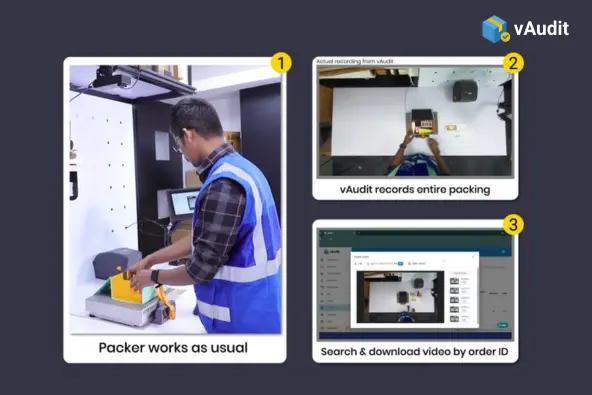
The video links to the order ID at the moment of capture. When the trigger event fires, the packing process video capture system reads the order ID from the scan, the screen, or the API payload and attaches it to the recording as the session opens.
From that point, the clip carries the order ID metadata. This data helps customer support teams to retrieve the exact footage in seconds.
The video proof capture and retrieval process looks like this:
- Packer scans the order ID.
- The packing video system starts recording.
- The order ID is linked to the session automatically.
- Packing happens as usual. The system records in the background.
- The packer completes the order.
- The clip is uploaded to the cloud with the order ID.
- The recording is now searchable by order ID.
This is the core of centralized packing proof management. The footage is not stored as a raw file in a folder somewhere. It is indexed into a searchable system tied to order records. When a claim comes in for order #18452, someone searches that number and the packing video appears.
Does packing process video capture change how packers work?
A packing video system triggers recording through actions the packer is already taking: scanning the order ID, opening it on screen, or completing the shipment. There is no separate button to press, no extra confirmation step, no interference with the packing screen. The system fits around the workflow rather than adding to it.
Packers who know their packing process is being captured on video tend to work more consistently, with more attention to each item and quantity check. That is not about pressure. It is about clarity. When the process is documented, there is less ambiguity about what happened at the station, which works in the packer’s favor. A clear video proof protects the packer when a claim is inaccurate.
Operations that introduce packing process video capture at the pack station tend to see faster adoption and better consistency across stations. The system works at scale when packers see it as part of a process that works for them.
Who accesses the footage after it is captured?
The packer does not need to access it. The recording is stored automatically on the cloud. The people who use the footage are the teams that need proof after the order has shipped.
| Team | When they use packing footage | What they are looking for |
|---|---|---|
|
Customer support |
When a customer claims a missing or wrong item |
Confirmation of what was packed before shipment |
|
Operations or QA |
During audits, error reviews, or process checks |
Packing accuracy, sequence adherence, exception patterns |
|
Finance or claims |
When a refund decision requires evidence |
Timestamped, order-linked proof of packing condition |
|
Account managers (3PLs) |
When a brand client disputes a shipment |
Order-level footage to share with the client directly |
All of these teams access footage through the same video logging system, searching by order ID. Nobody needs to know which camera, which shift, or which station. The order ID is the access point. That simplicity is what makes packing process video capture useful across teams rather than only for the warehouse.
Where does vAudit fit in?
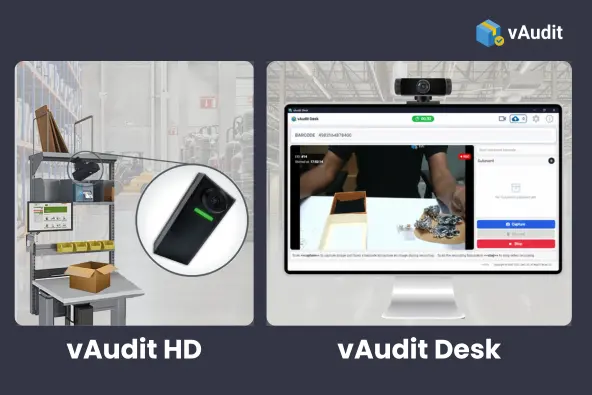
vAudit is a packing video system that handles packing process video capture for warehouses, 3PLs, and ecommerce brands. The packer scans the order ID to start recording, packs as normal, and scans again to stop. The session is uploaded to Forge Cloud, indexed by order ID, and immediately searchable.
Two hardware configurations are available. vAudit Desk runs on an existing desktop with a USB webcam, no new hardware required. vAudit HD is purpose-built station hardware for operations that want a dedicated setup, with barcode scan triggers and API-driven control for deeper integration with WMS, OMS, or ERP systems.
Both variants use Forge Cloud for centralized packing proof management. Footage retrieval, proof link sharing, device configuration, and team access are all handled through the same platform regardless of which station model the operation uses.
Frequently Asked Questions
Does packing process video capture work with any WMS or OMS?
It depends on the integration model. The Chrome extension approach supports web-based WMS and OMS platforms without requiring a custom integration. For operations that want the WMS or OMS to control recording start and stop directly, API-driven triggering is available through vAudit HD. vAudit Desk does not offer API capability. The right approach depends on how much control the existing system needs to have over the recording workflow.
Can multiple pack stations run packing process video capture at the same time?
Yes. Each station runs as an independent video logging system. Recordings from multiple stations running packing process video capture are pushed to the same Forge Cloud environment and stored separately by station and order ID. Operations teams can review footage from any station through the same search interface. There is no cross-session conflict because each recording is session-based and tied to a specific order at the time of capture.
What happens if a packer forgets to stop the recording?
Most configurations handle this automatically. OMS-triggered or API-driven systems stop the recording when the order is closed in the system, so the packer does not need to take any action. For barcode-triggered logging, the next scan typically closes the previous session and opens a new one. Manual stop configurations include timeout rules in the packing video system that close an idle session after a set period.
How much storage does packing video capture require?
Storage requirements depend on order volume, average packing time per order, and video resolution settings. Most packing sessions run between 30 seconds and 3 minutes. High-volume operations with many stations should factor retention period into their storage planning. Forge Cloud handles storage centrally, so individual stations do not carry local storage risk.
Can packing process video capture run without internet at the station?
The capture itself can run locally if the station loses connectivity temporarily. Footage is queued and pushed to Forge Cloud once the connection is restored. Sustained offline operation is not the intended deployment model, since centralized packing proof management depends on footage reaching the cloud for indexing and retrieval. Stable connectivity at the station is part of the standard setup requirement.
Get packing video proof for every order you pack
Record order ID linked packing videos and retrieve it in seconds with vAudit. Resolve costly customer disputes and verify every refund claims before approval with timestamped video proof.
"With just an internet connection and about an hour of setup, vAudit started auditing every packed order by ID right away. We saw measurable gains in fraud protection, warehouse control, and overall operational quality."

IQ Pack